Introduction
This documentation introduces qc, a free, open-source software package for
qualitative data analysis (QDA) designed to support the application of
computational thinking (CT) to qualitative research.
QDA, in its various
forms, is a core methodology for qualitative, mixed methods, and some
quantitative research in the social sciences. There are a variety of
well-known commercial QDA software packages such as NVivo, Dedoose,
Atlas.TI, and MaxQDA. I have used several of these individually and in
research groups; qc emerged from my loosely-theorized
dissatisfaction with these tools. I value open and extensible research
software; these were proprietary and expensive. I value “plain-text
social science” (Healy 2020); these graphical user interfaces (GUIs)
were user-friendly but ultimately limiting. As I developed prototypes of
qc for my own use in several prior research projects (Proctor,
Bigman, and Blikstein 2019), I found that I was continually augmenting
(Engelbart 1962) my ability to engage with complexity rather than
simplifying the problem space. The release of qc documented here
results from a redesign and reimplementation of the original tool, in
the hope that it will be useful to others.
Background
Qualitative data analysis
qc is designed to support the application of computational thinking
(CT) to the process of qualitative data analysis (QDA). In the social
sciences, QDA is a process of applying codes to text, images, video, and
other artifacts, then analyzing the resulting patterns of codes and
using the codes to more deeply understand the text. The adjective
“qualitative” applies to the data being analyzed (that is, the data
represents or describes something that happened) and potentially also to
the research design.
When QDA is used in quantitative or mixed-methods research, it is typically used as a means of transforming loosely-structured data such as an interview transcript into categories or codes which can then be used in downstream quantitative analysis. Within this paradigm, the data resulting from QDA are typically treated as observable variables standing in for latent representing latent constructs of interest. The researcher will prioritize reliability in QDA. Reliability means that if another researcher were to repeat the QDA process, they should expect similar results. If the QDA is not reliable, then there is no justification for claiming that the results of downstream analysis applies to the situation represented by the qualitative data. (Concern for validity often goes hand in hand with concern for reliability, but I do not address validity here because it is more related to how QDA supports a research argument than the process of QDA, and therefore less germane for the design rationale for a QDA tool.) Strategies for improving reliability vary according to methodology, but generally include the use of standardized codebooks, processes for training coders, and using measures of inter-rater agreement to confirm that different coders tend to arrrive at similar results.
In contrast, the goal of qualitative research is to interpret, explain, or “make the world visible” (Denzin and Lincoln 2011), often with central interest in how the researcher’s subjectivity (their sense of who they are) or positionality (their relationship to what is being studied) shapes the results. Reliability is often irrelevant to a qualitative research design; the reality under study is understood to be produced through the research, so the researcher’s subjectivity and positionality are essential traces of that process. Nevertheless, making the QDA process transparent by documenting and sharing the researcher’s iterative process of coding texts and developing interpretations would make qualitative research more persuasive, and could help other researchers understand the specific process which led to the results.
Commercial QDA software packages such as NVivo, Dedoose, Atlas.TI, and MaxQDA, are widespread and well-known; they are commonly taught in qualitative methods courses, and are a core part of many research groups’ methodologies. That said, my own observations suggest that there is quite a bit of heterogeneity in whether and how such tools are used in practice; collaborators’ preferences or budget pressure sometimes leads to a “lowest common denominator” of coding texts manually, or using ad-hoc tools such as word processors or spreadsheets. These can get the job done, but they have significant limitations with respect to interpretability and documentation of process. As the corpus or the research team grows, ad hoc tools become increasingly unwieldy.
Within the qualitative research community, there is a long-running
thread of skepticism toward QDA software (Jackson, Paulus, and Woolf
2018), focused on four main concerns: that digital tools create distance
between the researcher and the data; that if particular digital tools
become dominant they may homogenize and standardize qualitative
research; that digital tools mechanize and dehumanize qualitative
research; and that digital tools decontextualize qualitative data by
privileging quantification. The design rationale of qc takes these
concerns seriously, but argues that for users who are able to
conceptualize the QDA process in computational terms, a tighter
partnership with the computer may yield more intimate, situated,
humanized insights grounded in the researcher’s subjectivity.
Computational thinking
The central design hypothesis of qc is that a closer partnership
between the researcher and the computational tool can enhance the
quality of QDA. The kind of close partnership I have in mind depends on
the researcher’s ability to conceptualize the data and the process in
computational terms, becoming immersed in the matrices, trees, and other
computational structures inherent to QDA rather than remaining “outside”
at the level of user interface. This practice, called computational
thinking, has been defined as “the thought processes involved in
formulating problems and their solutions so that the solutions are
represented in a form that can effectively be carried out by an
information-processing agent” (Wing 2011, 33). The application of CT to
QDA would mean conceptualizing the goal and the process of QDA in
computational terms, keeping a mental model of the work the computer is
doing for you.
All QDA software will be a “leaky abstraction” (Spolsky 2002), a simplification which aims to let the user get their work done without needing to worry about the complexity of how the work is accomplished–and which only partially succeeds at this goal. Therefore, actively thinking about how one’s tools are modeling the problem is necessary, or at least has the potential to improve the tool’s effectiveness. As an analogy, statistical software can be a powerful tool which improves the efficiency and quality of research, but only when the user has a clear conceptualization of what they are trying to achieve and what the software is going to do for them. This requires a certain amount of expertise on the part of the user as well as a greater commitment to learning the tool, but asking such a commitment from the user is justifiable. There are many fields in which experts invest in learning specialized domains of computing. Examples include computer-aided design in architecture, expert use of Excel in finance, and even word-processing for users who choose to invest in learning vim or emacs. In all of these cases, the user has to get involved at least to some extent in the work the tool is doing for them.
In my own experience with QDA, several computational structures are
often salient; thinking about them has been helpful in improving both
the efficiency and the quality of my QDA practice. The codebook’s nested
tree of codes is the structure within which themes emerge from codes.
Open coding produces a flat list of codes; an iterative process of
grouping related codes together under parent codes gradually produces a
hierarchy of increasingly-grauluar meanings, often with several
top-level themes. qc’s affordances for showing code statistics and
finding coded excerpts of codes and their children helps guide this
process. I often conceptualize the process of querying for statistics
and coded examples in terms of a relational database, scoping queries by
code, coder, and document. Finally, I draw on concepts and practices
from version control systems such as git in managing research progress.
Tracking changes to the project makes it easier to document the process,
step back to previous versions, and to maintain multiple versions in
parallel.
Design rationale
This section explains how several design decisions support qc’s
goal of engaging CT in the QDA process.
Command-line interface (CLI)
The most surprising decision in the design of qc may be its
implementation as a command-line utility rather than a graphical user
interface such as a web application. Users who are not already persuaded
of the value of a text-based user interface (CLI) are unlikely to choose
this tool. While a graphical user interface (GUI) provides stronger
affordances (disclosing the actions available to the user), a CLI
requires the user to make a cognitive reach for what they are looking
for. In my own experience, however, a CLI invites a more active stance
than a GUI, requiring the user to reach “into” the sensemaking process,
maintaining an internal model of the emerging qualitative analysis.
A CLI is particularly strong where the underlying model is too complex to present in its entirety in a single view. QDA is an example of such a situation. Even in a moderately-sized corpus, there is too much text to be able to engage it directly and there are too many codes to hold in mind at once (never mind their emergent tree structure). If a GUI were to support such complex queries, it would likely be tucked away in a menu and would require a complex form–losing the GUI’s advantages in discoverability.
Rich query interface
Many of qc’s commands can be thought of as views onto the model;
in my QDA process I am constantly moving between coding, viewing
examples of previosuly-applied codes, revising the structure of the
codebook, running analyses, and writing memos. From time to time I am
also interested in comparing my coding with that of other team members.
qc’s queries offer a powerful array of options. Consider the
following query, whose complexity is not atypical in normal usage:
% qc codes stats equity participation --recursive-codes --recursive-counts \
--pattern round1 --min 5 --depth 2 --unit paragraph --format latex
This query reports counts for the codes “equity,” “participation,” and all their subcodes, showing usage for the code itself as well as a sum of counts for all subcodes, restricting the count to documents whose names match “round1” and using the paragraph as a unit of analysis. The query only reports codes which were used at least five times, and only goes two levels deep in the hierarchy. Finally, the output is formatted as latex.
The specifics of these options are covered in the following sections; what is important from a design perspective is how a query can be built up from multiple options similar to query-builder libraries in high-level programming languages which offer idiomatic interfaces for constructing SQL queries. This design is also informed by the UNIX philosophy (McIlroy, PInson, and Tague 1978), that programs should do one thing but do it well.
Storing data in text files
All files related to a qc project are contained within a directory:
project
├── codebook.yaml
├── corpus
│   ├── admin.txt
│   ├── board_member.txt
│   └── teacher.txt
├── memos
├── qualitative_coding.log
├── qualitative_coding.sqlite3
└── settings.yaml
At first glance, it may be surprising that project data is stored in
three different locations and formats (plain text files within the
corpus directory, the codebook in a yaml file, and other data in a
sqlite3 relational database), but there are practical benefits.
Corpus files are plain text, so they can be integrated into pipelines as
part of a broader research workflow. yaml is a structured data
format designed for human reading and writing, well-suited for editing
the tree of codes. Other project data, including relationships between
codes and document lines, is stored in a standard relational database in
a straightforward schema which could be integrated into other
applications. (The initial version of qc stored all data in text
files; the database was added to improve performance.) In almost all of
our existing qc projects, QDA is part of an analytical pipeline. The
prior and subsequent processes operate on these standard interfaces,
supporting flexible and creative uses of qualitative coding.
Vignette
In the style of vignettes published with R packages (Wickham and Bryan
2023), this section provides a narrative introduction to qc, guiding
a first-time user through installation and initial usage while also
pointing out features and suggesting workflows. The QDA workflow best
supported by qc is similar to that of other QDAS products: an
iterative cycle of “notice things,” “think about things,” and “collect
things” (Seidel 1998, 2). The primary difference between qc and
today’s well-known QDAS products is in the relationship between the user
and the software: qc provides different affordances for noticing,
thinking about, and collecting ideas during QDA.
Installation
Start by following the steps in Installation.
Explore an existing project
The fastest way to experience what qc has to offer is to start with
an existing project: an excerpt from the coded interview transcripts
from members of a committee considering whether to add computer science
to the district’s primary and secondard schools (Proctor, Bigman, and
Blikstein 2019). The commands below create a directory on the Desktop,
download the demo project, and unpack it into the directory.
$ cd ~/Desktop
$ curl -O https://computationalliteracies.net/people/chris/demo.qdpx
$ mkdir qc_demo
$ cd qc_demo
$ qc init --import ../demo.qdpx
Now let’s use qc to look around this project. Which documents are
included in the corpus?
% qc corpus list
admin.txt
board_member.txt
teacher.txt
What codes have been applied? qc codes stats will show all codes in
the codebook with a count of the number of uses across the whole corpus.
However this project was coded using open coding, resulting in 112
distinct codes–too many to easily comprehend. Instead, we will modify
the command to show the nested tree of codes, along with a count for
that specific code as well as a total for that code and all of its
children. Finally, --min 10 filters out codes used fewer than ten
times.
% qc codes stats --recursive-codes --recursive-counts --min 10
Code                              Count    Total
------------------------------  -------  -------
rq1_definition                        5       55
.  rationales                         0       27
.    equity                          12       15
rq2_curriculum_and_instruction        0       93
.  curriculum                         4       47
.    cs_scope_and_sequence            0       11
.    graduation_requirement          16       16
.    interdisciplinary_cs             2       11
.  pedagogy                           4       43
.    participation                    3       15
.    tools                            1       14
rq3_process                           0      102
.  identity                           0       60
.    computational_identity           6       27
.    identity_categories              1       27
.      gender                        20       20
We can zoom in on particular codes using the same command. For example,
the following command shows the code tree for rationales, or
justifications given for why computer science ought to be taught in
primary and secondary schools. We again specify recursive codes and
recursive counts, this time using the short form of these flags
(-ra). We also add the --by-document flag, to get a sense of
differences across interviewees.
% qc codes stats rationales -ra --by-document
                                admin.txt    board_member.txt    teacher.txt    Total
-------------------------------  -----------  ------------------  -------------  -------
rq1_definition:rationales                 12                  10              5       27
.    equity                                7                   8              0       15
.      every_student                       2                   0              0        2
.      everyone_should_learn_cs            1                   0              0        1
.    exposure                              3                   1              4        8
.    job                                   2                   1              1        4
It appears that equity (as a rationale for teaching computer science) came up more in interviews with the administrator and the board member than with the teacher. To explore this pattern, we can we can view lines coded with “equity,” or any of its child codes.
% qc codes find equity -r

admin.txt (7)
================================================================================
[40:45]
learning computer science when I went to college at Organization_339 back in the |
early '70s and I could see that was something that I thought, just like math,    |
every kid should know. So, fast forward to when I got to Location_92, which was  | everyone_should_learn_cs
in the early '80s, I got there in '83 and I started teaching computer science    |
in about '85, as well as math and I recognized that it was a niche class and it  |

[93:98]
academic officer, the elementary academic officer, just figured we would spin    |
our wheels and we wouldn't go anywhere but when we started talking about         |
opportunity, she recognized that was an opportunity for all students and being   | equity
a member of the underrepresented minority, she got behind us, which was great.   |
However, this year, she did not come to our meetings because she didn't think    |

[118:123]
kids, that they would have English as a second language kids so that we could    |
make sure that we were going to create a program that would meet the needs of    |
all the students and create opportunity for all students to learn computer       | equity
science, not just programming but the team work and the thinking, the            |
analytical thinking that goes into computer science but definitely programming   |
Here’s an interesting pattern: the discussion of equity tends to be
framed in universal terms–what “every kid should know;” an “opportunity
for all students.” This consideration of what students should learn
feels connected to the “participation” codes under research question 2
(how CS should be taught) and the “committee_participation” codes under
research question 3 (the decision-making process which should be used).
We can use a cross-tabulation to quickly explore this idea. The -a
flag again counts all subcodes. This time we omit -r; including
subcodes as separate items in the cross-tabulation would make the table
unweildy.
% qc codes crosstab -a equity participation committee_participation
                code    equity    participation    committee_participation
-----------------------  --------  ---------------  -------------------------
                 equity        15                7                          0
          participation                         15                          0
committee_participation                                                     9
The “equity” and “participation” codes co-occur quite a bit, but neither co-occurs with “committee_particpation.” This illustrates one of the paper’s findings: that many of the well-documented attitudes and stereotypes that exclude students from computer science learning in the classroom also appeared in decision-making processes about K12 computer science, such as the committee under study.
The default unit of analysis is a line, so that the cross-tabulation
above shows how many lines have both codes. The --unit option could
be used to specify a different unit of analysis (paragraph and
document are supported; a window-based unit of analysis is under
development).
The next steps from here might include additional coding (using
qc code), adding hierarchical structure to the codebook (
edit codebook.yaml using an editor of your choice), viewing code stats
after editing the codebook,
and writing memos (qc memo) to document
emerging themes. We have found that in larger projects, the options to
scope queries to subsets of coders or subsets of the corpus become
increasingly useful. The query outputs shown above can also be formatted
as CSV or JSON for downstream processing, or as LaTeX, HTML, or many
other formats for inclusion in a publication.
Create a new project
Setup
This section is a guide to starting a new qc project. Either save
the excerpt below as teacher_2.txt on your Desktop (another teacher
interview from the project described in the previous section), or select
one or more of your own documents to work with.
These could be in any text-based file format (the default
importer uses Pandoc, and so can handle any
file format supported by Pandoc.)
Research_Assistant:         So just to start, it would be helpful to
understand what your background is in computer science and also with
Location 63.

Person_121:    So, I worked for years in the tech industry before I decided
to teach elementary school. I wasn't, so my background is engineering but not
computer science, though the work I was doing was programming. And so after
fifteen years in the tech industry, I lost my job, I went back to school, I
did my multiple subject credential, and I started teaching as an elementary
school teacher in Location 63.

Person_121:    So I literally just started as a classroom teacher, nothing
else. I had no CS in mind at that time. And right about the time I started in
Year was around the time Location 63 was getting smart boards in the classroom,
one by one and I got to test that.  And then one thing led to another and I
noticed how students who otherwise may not be motivated learning were motivated
by the use of technology, so I got more into using technology with teaching to
engage the students and engage them as a result.

Person_121:    During the course of that, I stumbled upon Scratch, and
you're probably familiar with Scratch, I'm not sure, but it's the language
developed at MIT Media Lab with children in mind. While I was still a fifth
grade classroom teacher, I stumbled upon that and I thought oh this is
fantastic and it'll be great to use with my classroom. So, I created a unit
that I started doing that spring, and every single child was not only super
engaged, but it was the creative aspect, the problem solving and the teamwork
that went with it and all of these other skills that I noticed that. And then
made learning more fun, of course. And they were learning a lot. So this was
like in, I don't know, many years ago and the only thing that existed at that
time was Scratch for children. And I think Scratch was probably usable at that
time, til maybe fourth grade, but that would also be pushing it a little, but
fifth was just sort of right.
Create a new directory on your filesystem. In this example, we will
initialize a new project in a directory called qc_project on the current
user’s desktop, and intialize a new project.
% cd ~/Desktop
% mkdir qc_project
% cd qc_project
% qc init
When qc init is run, a settings file (settings.yaml by default)
is created with default values, and project assets are created in
in the locations specified in the settings file. Running ls will show
the contents of our project. (See Storing data in text files for details.)
~/Desktop/qc_project % ls
codebook.yaml
corpus
memos
qc.log
qualitative_coding.sqlite3
settings.yaml
Import documents
Now let’s import the document. When you import a document,
qc creates a plain-text formatted copy within corpus and adds
document metadata to the database. If you are going to import your own document,
use its file path instead of ~/Desktop/teacher_2.txt in the command below.
If you want to keep a text document’s existing formatting, use
--importer verbatim to tell qc not to apply any formatting.
$ qc corpus import ~/Desktop/teacher_2.txt
We can confirm that the document was imported by listing corpus documents.
% qc corpus list
teacher_2.txt
Coding
Now we will code the document. What kind of codes should be used? This is a broad topic beyond the scope of this vignette; a well-designed qualitative research project should clearly articulate its methodological choices and ground them in a theoretical framework. For this example, we will be a bit informal: we will use open coding (codes are not restricted to a predefined codebook) with a mix of in vivo (using participants’ words as codes) and in vitro (using the coder’s interpretation as codes) coding, with an analytical focus guided by the codebook in the previous section.
You will code your document using a text editor. Visual Studio Code is the default editor;
see editor for other options. Run qc code user, where user is
the username you want to use while coding. This will launch your editor with
the document to be coded and codes.txt (containing any existing codes, otherwise empty)
side-by-side as shown in Figure 1. Add codes to codes.txt on the line corresponding
to a line in the corpus document. Each code may be any combination of letters,
numbers, and underscores; when multiple codes are applied to a line,
separate them with a comma. Save your changes and close the editor to end the
coding session. qc will read codes.txt, update the database
with changes in coded lines, and then delete codes.txt.
Note
If you are using Visual Studio Code, the document and the coding file will probably open in separate tabs. Split the view (View -> Editor Layout -> Split Right), drag them so they are side-by-side, and then enable the Scroll Sync extension if installed, to keep the line numbers in each document aligned.

Figure 1. Screen shot of the coding interface using Visual Studio Code.
Organizing the codebook
Now that you have finished coding, qc will have updated your codebook with all new codes.
To continue the cycle of “notice things,” “think about things,” and “collect
things” (Seidel 1998, 2), let’s see a summary of our coding.
% qc codes stats

Code                       Count
-----------------------  -------
creativity                     1
developmental_fit              1
elementary                     1
engineering                    1
i_had_no_cs_on_my_mind         1
increased_motivation           1
made_learning_fun              1
problem_solving                1
professional_experience        1
scratch                        2
smart_boards                   1
stumbled_upon_tech             1
teacher_agency                 1
A simple count of discrete codes might be just right for some projects, but
if we want to start making sense of the coding it would help to organize the
codebook, grouping similar codes together. To do this, edit the nested structure
of codes in codebook.yaml. (Run code codebook.yaml to open the codebook in
Visual Studio Code). Initially, the codebook is just a list of codes:
- creativity
- developmental_fit
- elementary
- engineering
- i_had_no_cs_on_my_mind
- increased_motivation
- made_learning_fun
- problem_solving
- professional_experience
- scratch
- smart_boards
- stumbled_upon_tech
- teacher_agency
Some of these codes belong together. For example, “scratch” and “smart_boards” are both technologies. “creativity,” “increased_motivation,” “made_learning_fun,” and “problem_solving” were all named as reasons for teaching computer science. (As with coding, different qualitative methodologies have different approaches to organizing codes.) After grouping codes together, our codebook looks like this:
- reasons_for_teaching_cs:
  - creativity
  - increased_motivation
  - made_learning_fun
  - problem_solving
- teacher_identity:
  - elementary
  - engineering
  - professional_experience
- technologies:
  - scratch
  - smart_boards
- trajectory:
  - developmental_fit
  - i_had_no_cs_on_my_mind
  - stumbled_upon_tech
  - teacher_agency
Now the stats are more meaningful, especially if we show codes in
their nested structure (--recursive-codes, -r) and the
sum of each code and its children (--recursive-counts, -a).
% qc codes stats -ra
Code                          Count    Total
--------------------------  -------  -------
reasons_for_teaching_cs           0        4
.  creativity                     1        1
.  increased_motivation           1        1
.  made_learning_fun              1        1
.  problem_solving                1        1
teacher_identity                  0        3
.  elementary                     1        1
.  engineering                    1        1
.  professional_experience        1        1
technologies                      0        3
.  scratch                        2        2
.  smart_boards                   1        1
trajectory                        0        4
.  developmental_fit              1        1
.  i_had_no_cs_on_my_mind         1        1
.  stumbled_upon_tech             1        1
.  teacher_agency                 1        1
Depending on the qualitative methodology being used, you might want to iterate between coding and organizing the codebook. After open coding, we often have multiple codes with similar meanings. Sometimes we choose to rename or merge codes to reduce the total number of distinct codes, but more often we just group similar codes together as subcodes, and then use the parent code in our analysis.
Commands are provided for renaming and merging codes (codes rename), dele coding scheme stabilizes
Viewing coded text
If you want to think about the meaning of a group of codes, it is helpful to
see relevant excerpts from the document. Let’s view excerpts which were coded
with “trajectory,” using --recursive-codes or -r to also include its
children.
% qc codes find trajectory -r

teacher_2.txt (4)
================================================================================
[9:14]
                                                                                 |
Person_121: So I literally just started as a classroom teacher, nothing else. I  |
had no CS in mind at that time. And right about the time I started in Year was   | i_had_no_cs_on_my_mind
around the time Location 63 was getting smart boards in the classroom, one by    |
one and I got to test that. And then one thing led to another and I noticed how  |

[19:25]
probably familiar with Scratch, I’m not sure, but it’s the language developed at |
MIT Media Lab with children in mind. While I was still a fifth grade classroom   |
teacher, I stumbled upon that and I thought oh this is fantastic and it’ll be    | stumbled_upon_tech
great to use with my classroom. So, I created a unit that I started doing that   | teacher_agency
spring, and every single child was not only super engaged, but it was the        |
creative aspect, the problem solving and the teamwork that went with it and all  |

[27:30]
years ago and the only thing that existed at that time was Scratch for children. |
And I think Scratch was probably usable at that time, til maybe fourth grade,    |
but that would also be pushing it a little, but fifth was just sort of right.    | developmental_fit
Memoing
Often, looking at groups of codes together leads to conceptual insights worth documenting.
qc provides a simple integrated memoing function which uses your text editor to open
a new file in your memos directory.
% qc memo chris --message "How teachers get involved with CS"
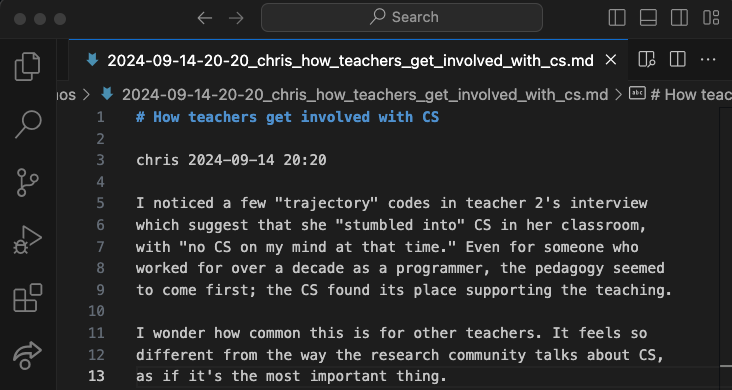
Figure 3. A memo.
From here, you are ready to import more documents, continue coding,
refining the codebook, and
the iterative cycle of “notice things,” “think about things,”
and “collect things” which characterizes QDA. Please feel free to
contact the authors for support, or to share your experience with
qc.
Advanced patterns
Collaboration in heterogeneous groups
Preferences and comfort levels with tools often varies across research teams,
and requiring the use of specific tools can be a source of inequitable gate-keeping.
We have successfully used qc in several research collaborations
where some team members preferred to code in a shared spreadsheet.
By importing members’ coding into qc,
we have been able to access the full power of qc, while allowing everyone
to use a tool that is comfortable.
Here is one simple workflow: copy a corpus document into a shared spreadsheet,
and then create a column for each coder, as shown in Figure 2.
When you are ready to transfer codes into qc, open the document for
coding (e.g. qc code chris), and replace the entire contents of
codes.txt with the appropriate column from the spreadsheet. Save and close
the editor.
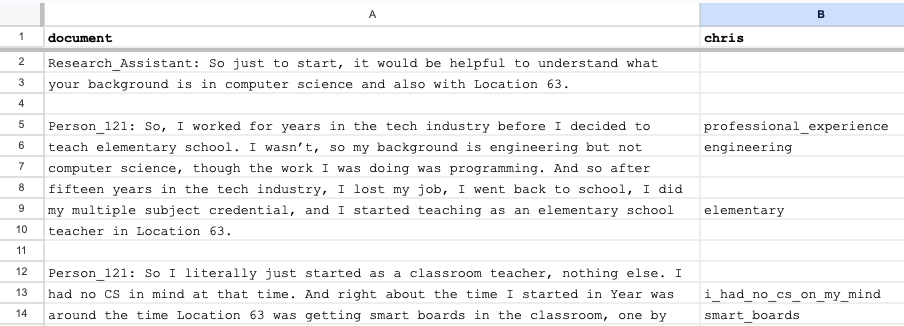
Figure 2. An online spreadsheet ready for coding.
Automated coding
You could automatically apply codes to a document by writing a script and defining it as an editor (see editor); the script would receive the path to a corpus file and the codes file, and would write codes into the codes file. For example, when we were analyzing student-written computer programs, we combined manual qualitative coding with automated static analysis of the programs, which added codes marking syntactic structures and manipulation of variables. This allowed us to integrate what students were doing (via our qualitative coding) with how they were doing it (via static analysis).
This technique could easily be used to automatically code documents using large
language models (LLMs), sending the document to the LLM along with a prompt asking
for codes on separate lines. Most major QDA tools now offer AI-assisted coding.
We have major methodological concerns, but feel that if researchers are going to
rely on AI, they ought to understand what is being done and participate in
guiding the AI, likely through a human-in-the-loop workflow.
We are currently prototyping extensions to qc to support AI-assisted coding.
Multiple codebooks
Much of qc’s power comes from the ability to quickly and easily
iterate the structure of the codebook, and then to see the results
through flexible and powerful queries which use the codebook. Sometimes
it even makes sense to maintain multiple codebooks. For example, after a large
and messy initial round of coding, we often want to significantly refactor
the codebook, merging and deleting codes, and organizing them according
to the constructs we have decided to focus on. We prefer to do this refactoring
in new codebooks so that it is easy to explore multiple alternatives.
We also use multiple codebooks when we are re-coding an existing corpus for a
new analysis focused on different constructs.
The easiest way to work with multiple codebooks is to have multiple settings
files, each specifying a different codebook. Then specify the desired settings
file when running qc commands. See Settings for details.
Alternatively, if the project is stored in a version control system such as git (highly recommended), changes to the codebook can be maintained in separate branches of the repository.
Package documentation
All qc commands are described below with their most common options,
as of version 1.3.2. Use --help for a full and up-to-date list
of available options for each command.
General commands
init
Initializes a new coding project. If the settings file is not present, writes the settings file with default values and then initializes project assets (e.g. the corpus directory, the codebook, the database, the log file) as specified in the settings file.
If you wish to edit the settings file before creating project assets (e.g.
to specify a different location for the corpus directory), use the
--write-settings-file (-w) flag. This will write the settings file and
then stop. Make any desired edits, and then run qc init again.
It is safe to re-run qc init.
% qc init
check
Checks that all required files and directories are in place.
% qc check
code
Opens your text editor with a corpus file and a temporary coding file.
The name of the coder is a required positional argument. After optionally
filtering the corpus using common options
(below), select a document with no existing codes (for this coder) using
--first (-1) or --random (-r). Otherwise, you will be
presented with a list of corpus files and asked to choose which to code.
% qc code chris -1
Save and close your editor when you finish. In the unlikely event that
your editor crashes or your battery dies before you finish coding, your
saved changes are persisted in codes.txt. Run qc code <coder> --recover
to resume the coding session, or qc code <coder> --abandon to delete
the coding session.
codebook (cb)
Ensures that all codes in the project are included in the codebook. (New
codes are added automatically, but if you accidentally delete some while
editing the codebook, qc codebook will ensure they are all present.)
% qc codebook
coders
List all coders in the current project.
% qc coders
memo
Opens your editor to write a memo, optionally passing --message
(-m) as the title of the memo. Use --list (-l) to list all
memos.
% qc memo chris -m "It's all starting to make sense..."
export
Export the current project in .qpdx format. See Interoperability with other QDA software.
upgrade
Upgrade a qc project from a prior version of qc.
Upgrade (or downgrade) to a specific version using --version (-v).
% qc upgrade
version
Show the current version of qc. This project uses semantic
versioning.
% qc version
qualitative-coding 1.4.0
Corpus commands
The following commands are grouped under qc corpus.
corpus list (ls)
List all files in the corpus.
% qc corpus list
corpus import
Import files into the corpus, copying source files into corpus,
formatting them (see options), and registering them in the database.
Individual files can be imported, or directories can be recursively
imported using --recursive (-r).
% qc corpus import transcripts --recursive
If you want to import files into a specific subdirectory within the
corpus, use --corpus-root (-c). For example, if you wanted
to import an additional transcript after importing the transcripts
directory, you could run:
% qc corpus import follow_up.txt --corpus-root transcripts
Several importers are available to format files, and can be specified
using --importer (-i). The default importer, pandoc, uses
Pandoc to convert files into plain-text, and
then hard-wrap them at 80 characters. verbatim imports text files
without making any changes. Future importers will include text
extraction from PDFs and automatic transcription of audio files.
corpus move (mv)
Move a document from one corpus path to another, or recursively move a
directory with --recursive (-r). Do not move corpus files
directly or they will become out of sync with their metadata in the
database.
% qc corpus move corpus/interview.txt corpus/pre/annabelle.txt
corpus remove (rm)
Remove a document from the corpus, along with codes applied to the
document. Or recursively remove all documents in a directory with
--recursive (-r).
% qc corpus remove corpus/pre/annabelle.txt
corpus update
Update a document in the corpus. When a document changes, qc
needs to update the positions of all existing coded lines, which requires
access to the old version and the updated version. Documents
can be updated using two strategies. First, provide a new version
of the document, stored outside of the corpus:
% qc corpus update corpus/interview.txt --new revised_interview.txt
If your project is stored in a git repository (highly recommended), you can also edit the document directly; the committed verison of the document is considered the old version.
% qc corpus update corpus/interview.txt
Use --dryrun (-d) to show a diff of the changes without updating the
corpus.
corpus anonymize
Note
This command requires installing the optional language model. See Installation.
Anonymize corpus documents. Documents containing personally-identifiable information (PII) frequently need to have this imformation removed in order to protect the privacy of research participants. This can be automated using Named Entity Recognition (although it is not perfect; make sure you check for PII). It is often good practice to remove PII from documents as early in the analysis process as possible.
First, generate a key file mapping named entities (e.g. people, places, organizations) to placeholders.
% qc corpus anonymize
The key file is called key.yaml by default; choose another name with
--key (-k) when necessary. Now edit the key file. All terms appearing
in the key file will be substituted for their placeholders, so delete any
terms which you want to preserve. Often the same person is referred to in
different ways; it’s fine to assign the same placeholder to several terms.
For example:
Chris Proctor: Person_1
Dr. Proctor: Person_1
Chris: Person_1
If you later reverse the anonymization, placeholders will be replaced with the first matching term. So “Person_1” will be replaced with “Chris Proctor.”
Once the key file is ready, create anonymized copies of corpus documents:
% qc corpus anonymize
This time, the key file already exists, so anonymized copies of the corpus are
created in anonymized (specify another directory with --out-dir (-o)).
If you want to update the corpus with the anonymized versions, use
--update (-u). At this point, you could move the key
file to another computer to protect the PII.
If you later wish to de-anonymize the corpus, move the key file back into
the project and run:
% qc corpus anonymize --reverse
Codes commands
The following commands are grouped under qc codes.
codes list (ls)
Lists all the codes currently in the codebook.
% qc codes list --expanded
codes rename
Goes through all the code files and replaces one or more codes with another. Removes the old codes from the codebook.
% qc codes rename humorous funy funnny funny
codes find
Displays all occurences of the provided code(s).
% qc codes find math science art
codes stats
Displays frequency of usage for each code. Note that counts include all
usages of children. List code names to show only certain codes. In
addition to the common options below, code results can be filtered with
--max, and --min.
% qc codes stats --recursive-codes --depth 2
Use --by-coder (-C) for separate columns for each coder, and
--by-document for separate columns for each document. When
--by-coder and --by-document are given, displays a pivot table
of code counts by document and coder. (Optionally filter coders using
--coders (-c) and filter documents using the options listed
below in “Filter the corpus.”)
codes crosstab (ct)
Displays a cross-tabulation of code co-occurrence within the unit of
analysis, as counts or as probabilities (--probs, -0).
Optionally use a compact (--compact, -z) output format to
display more columns.
% qc codes crosstab planning implementation evaluation --recursive-codes --depth 1 --probs
Common options
Specify the settings file
Every qc command supports --settings (-s), which allows you
to specify a settings file. This makes it possible to run qc
commands from outside the project directory or from within scripts
without ambiguity. Sometimes it is also helpful to keep multiple
settings files in a project, for example when different coders prefer
different editors, or if you wish to keep multiple versions of the
codebook with different code trees.
The settings file can also be specified via the QC_SETTINGS
environment variable. This makes it easy to check multiple settings
files into version control (e.g. for users with different preferences,
or to try out different codebook structures) while still using the
intended settings file without needing to specify it.
Filter the corpus
Commands which operate on or iterate over the corpus have options to filter which documents are included.
--pattern [pattern](-p): Only include corpus files and their codes which matchpatternas a substring of the document path.--filenames [filepath](-f): Only include corpus files listed infilepath(one per line).
Filter code selection
code[codes]: Many commands have an optional positional argument in which you may list codes to consider. If none are given, the root node in the tree of codes is assumed.--codercoder(-c): Only include codes entered bycoder(if you use different names for different rounds of coding, you can also use this to filter by round of coding).--recursive-codes(-r): Include children of selected codes.--depthdepth(-d): Limit the recursive depth of codes to select.--unitunit(-n): Unit of analysis for reporting. Currently “line”, “paragraph”, and “document” are supported. Paragraphs are delimted by blank lines.--recursive-counts(-a): When counting codes, also count instances of codes’ children. In contrast to--recursive-codes, which controls which codes will be reported, this option controls how the counting is done.
Output and formatting
--formatformat(-m): Formatting style for output table. Supported values include “html”, “latex”, “github”, and many more.--expanded(-e): Show names of codes in expanded form (e.g. “coding_process:grounded”)--outfileoutfile(-o): Save tabular results to a csv file instead of displaying them to the screen. This is particularly useful in scripts.
Settings
The behavior of qc can be configured using your settings file,
which by default is settings.yaml. New projects are created with
sensible defaults. The following settings are available:
qc_version
The version of qc you are using. Do not change this; use qc upgrade if
you need to upgrade to a new version of qc.
corpus_dir
The location of your corpus. Default: corpus.
database
The path to your qc database file. Default: qualitative_coding.sqlite3.
memos_dir
The path to memos created with qc memo. Default: memos.
codebook
The path to the codebook file. Default: codebook.yaml.
editor
Name of the code editor. Default: code (Visual Studio Code). The following editors are
supported:
codevimnvimemacs
Additional editors can be specified in an optional editors setting, as shown below.
Specify a terminal command which should be invoked for coding a document (using
placeholders for {corpus_file_path} and {codes_file_path}). Additionally, specify
a terminal command which should be invoked for writing memos, using a placeholder
for {memo_file_path}.
For example, if you wanted to use Sublime Text,
you would need to make sure Sublime Text can be called from the terminal
(instructions), and then use
the following configuration in settings.yaml:
editor: sublime
editors:
  - sublime:
    name: Sublime Text
    code_command: 'subl "{corpus_file_path}" "{codes_file_path}" --command "new_pane" --wait'
    memo_command: 'subl "{memo_file_path}" --wait'
Additional examples are available in qc’s built-in editor support.
During coding, qc creates a temporary codes file with the same number of lines
as the corpus document and existing codes on the appropriate lines.
The coder should update and save the codes file. When the code command successfully
terminates, qc reads the codes file, updates the codes in the project database, and
then deletes the temporary codes file and the metadata file.
log_file
Path of the log file. Default: qc.log.
verbose
When set to true, human-readable logs will be printed to the screen after each command,
providing more detail about commands. Default: false.
Logging
qc uses structlog, and emits JSON-formatted logs
to support later analysis (e.g. for research on qualitative data analysis practices)
or to document the coding process. Custom structlog configuration may be stored in
log_config.py, allowing qc’s logs to be integrated into a project’s logs or
sent to a central logging server.
Interoperability with other QDA software
A working group representing the major QDA software vendors published
the REFI-QDA standard (van Blommestein 2019) specifying a standard data
format for moving QDA projects between software platforms. qc
supports the REFI-QDA standard, allowing projects to be imported and
exported.
However, the REFI-QDA standard recognizes that designs of QDA software
will vary, and the standard does not require that compliant products
import or export with complete fidelity. As noted in the REFI-QDA
standard 1.5, data loss is likely when a project is exported from one
QDA software package into another and back (roundtripping), as neither
package is obliged to implement the full specification. qc’s user
interface and data model are quite different from well-known GUI-based
alternatives. Specifically:
Whereas most QDA software allows users to code highlighted selections in text documents (identified by start and end character positions), the fundamental unit of analysis in
qcis the line. Exportedqcprojects represent coded lines as selections ranging from the first to the last character in the corresponding line. When QDA projects are imported intoqc, selections are mapped onto the first corresponding line.Cases, or groupings of corpus documents, are not explicitly supported in
qc, althoughqccorpus documents can be organized into a nested directory tree. Every relevantqccommand affords filtering documents by pattern or by explicit file list, so documents can effectively (but implicitly) be treated as belonging to cases.qccorpus documents do not have variables.Nested codes are central to the operation of
qc, and every node in the code tree is considered a code. Sets (groupings of codes which are not themselves codes) are not supported.Notes as defined in the REFI-QDA standard are implemented as memos in
qc, and belong to the project, not to corpus documents or to selections. The REFI-QDA standard supports coding of notes. This is not explicitly supported inqc, but memos could be imported into the corpus and then coded if desired.
Contributing

Development of qc follows the Contributor Covenant.
Chris Proctor (chrisp@buffalo.edu), the project lead, would be delighted to hear
about your experience using qc.
Bug reports, feature requests, and discussion of the future directions of
qc takes place on the project repository’s
issues page.
Code contributions to this project should be via pull requests on this repository.
If you are considering using qc in a research project or need help, you are
also welcome to contact Chris directly via email.
Acknowledgements
Partial support for development of qc was provided by UB’s Digital Studio Scholarship
Network. Logo design by Blessed Mhungu.
References
Denzin, Norman K, and Yvonna S Lincoln. 2011. The Sage Handbook of Qualitative Research. sage.
Engelbart, Douglas C. 1962. “Augmenting Human Intellect: A Conceptual Framework,” 64–90.
Healy, Kieran. 2020. “The Plain Person’s Guide to Plain Text Social Science.”
Jackson, Kristi, Trena Paulus, and Nicholas Woolf. 2018. “The Walking Dead Genealogy: Unsubstantiated Criticisms of Qualitative Data Analysis Software (QDAS) and the Failure to Put Them to Rest.” The Qualitative Report, March. https://doi.org/10.46743/2160-3715/2018.3096.
McIlroy, Doug, E PInson, and B Tague. 1978. “UNIX Time-Sharing System.” The Bell System Technical Journal, 1902–3.
Proctor, Chris, Maxwell Bigman, and Paulo Blikstein. 2019. “Defining and Designing Computer Science Education in a K12 Public School District.” In Proceedings of the 50th ACM Technical Symposium on Computer Science Education, 314–20. SIGCSE ’19. New York, NY, USA: Association for Computing Machinery. https://doi.org/10.1145/3287324.3287440.
Seidel, John V. 1998. “Qualitative Data Analysis.”
Spolsky, Joel. 2002. “The Law of Leaky Abstractions.” Joel on Software.
van Blommestein, Fred. 2019. “REFI-QDA: Exchange of Processed Data Between Qualitative Data Analysis Software Packages.”
Wickham, Hadley, and Jennifer Bryan. 2023. R Packages. ” O’Reilly Media, Inc.”.
Wing, Jeanette. 2011. “Research Notebook: Computational Thinking—What and Why.” The Link Magazine 6: 20–23.